-1.png&w=3840&q=75)
Document Workflow Automation: Architecture, APIs, and Production Patterns
Learn how to build reliable document workflow automation using classification, parsing, splitting, extraction, editing, validation, and asynchronous delivery.
Most document automation demos begin with a clean PDF and end with a JSON object. Production systems live in the space between those two screenshots.
Real inputs arrive as scans, forms, spreadsheets, presentations, and multi-document packets. Different files need different processing. Some results can move directly into a database; others require validation, source evidence, or human review.
Document workflow automation is the system that coordinates those decisions and turns incoming files into reliable outcomes.
TL;DR
- A production document workflow usually combines intake, classification, parsing, splitting, extraction, validation, and delivery; some workflows also use Edit to write approved data back into a PDF or DOCX file.
- OCR is one stage, not the complete workflow.
- Parse a document once and reuse that representation across downstream operations.
- Keep business validation, authorization, and irreversible actions in application code.
- Use asynchronous jobs and idempotent webhooks for large or background workloads.
- Version workflows and schemas, record exceptions, and measure the complete system rather than one model response.
What is document workflow automation?
Document workflow automation is the orchestration required to turn a document into structured data, a searchable representation, or a business action.
A workflow may:
- accept a file or secure file reference;
- identify the document type;
- recover text, tables, figures, and layout;
- divide a packet into logical sections;
- extract selected fields into a schema;
- validate the result and route exceptions;
- optionally write approved data back into a PDF or DOCX document;
- deliver approved output to a database, search index, agent, or review interface.
OCR only recovers text from an image. A production workflow must also preserve structure, select the next operation, handle failures, and maintain an observable state for every document.
Reducto exposes Classify, Parse, Split, Extract, and Edit as standalone APIs and reusable pipelines. Your application still owns business rules, authorization, persistence, and the decision to act on a result.
Document workflow automation architecture
The most reliable design separates document understanding from application policy.
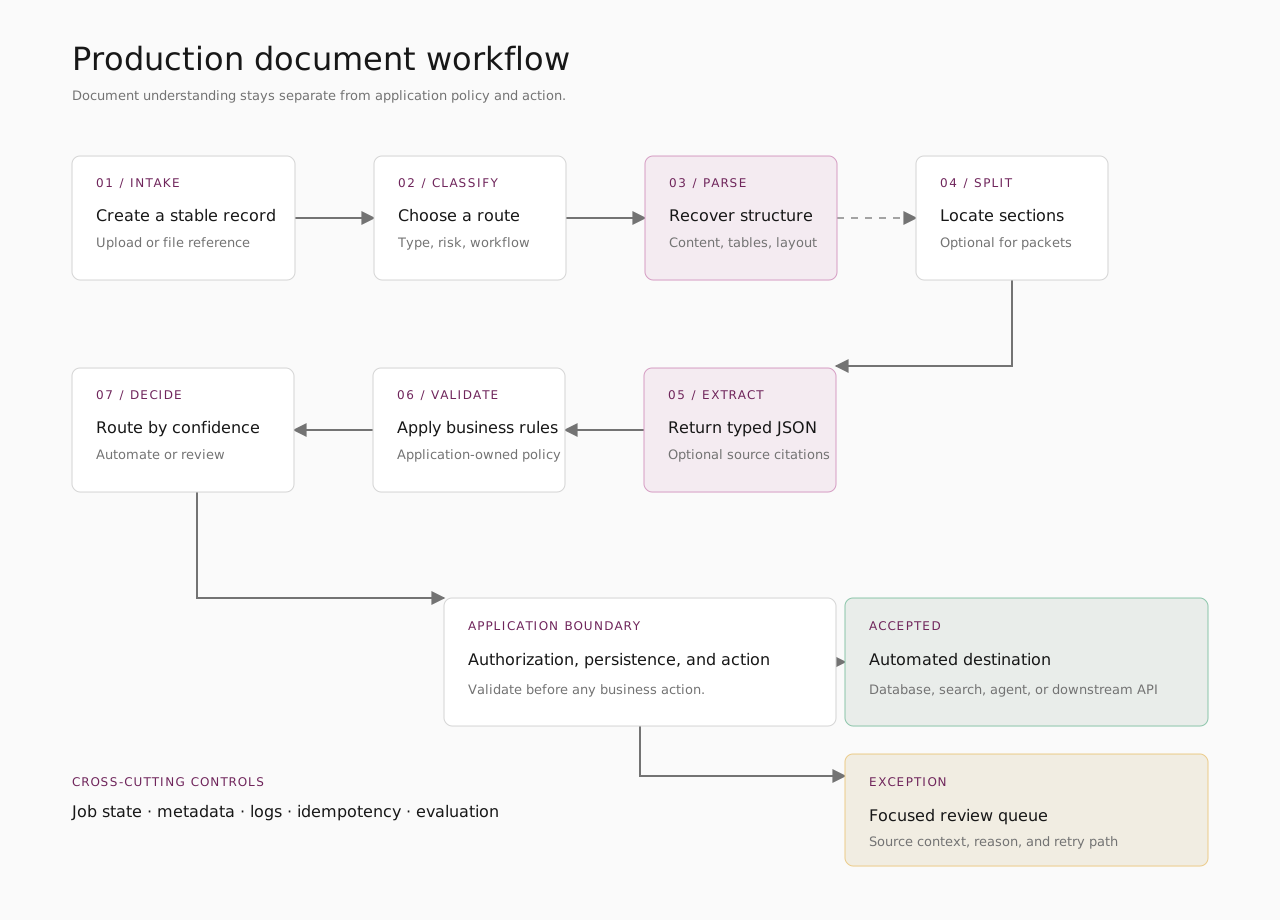
The stages should remain modular. A RAG ingestion workflow may stop after Parse. An invoice workflow may Classify, Parse, and Extract. A claims packet may require Split before applying different schemas to each section. A form-completion workflow may use Edit only after extracted values pass validation and authorization.
The right architecture is the smallest complete workflow that produces the outcome the application needs. Reducto’s Standard list rates support that stage-by-stage approach: r-1 Parse is $10 per 1,000 pages, Classify is $7.50 per 1,000 pages, Split is $20 per 1,000 pages, and Extract is $20 per 1,000 pages with parsing included.
1. Create a durable intake record
Create an internal record before processing starts. Store:
- the application's document identifier;
- tenant, workspace, and source;
- a content hash or duplicate-detection key;
- workflow and configuration version;
- current state and processing job identifiers.
Reducto Parse accepts an upload reference, public URL, presigned storage URL, or previous job reference. See Parse input options.
Keep the business document separate from the processing job. A job may be retried or replaced, while the document should retain the same identity. This makes deduplication, audits, and reprocessing easier.
2. Classify before choosing the processing route
Different document types often require different schemas, parsing settings, and review thresholds. Applying one configuration to every file becomes brittle as the input mix expands.
Reducto Classify selects from categories defined by the application. Those categories should correspond to processing decisions:
| Category | Workflow decision |
|---|---|
invoice |
Parse, then Extract line items and totals |
contract |
Parse, then Extract parties, clauses, and dates |
multi_document_packet |
Split, then process each logical section |
other |
Use a conservative fallback or send to review |
Always include a fallback. A best match is not automatically a safe business decision. For a detailed comparison of classification platforms and operating models, see Best Document Classification Software in 2026.
3. Parse once and split only when needed
Reducto Parse converts the source into structured JSON containing document content, chunks, and layout-aware blocks such as paragraphs, tables, headers, and figures. The output can include page positions and confidence information.
That representation can support:
- semantic chunks for search and RAG;
- page-aware document review;
- structured tables;
- multiple downstream extraction attempts.
Reuse the same Parse result instead of repeatedly processing the source. Reducto documents a jobid:// pattern for passing a prior Parse result into later Split or Extract operations.
Chunking and splitting solve different problems. Chunking creates smaller units for retrieval. Split locates larger logical sections inside a packet. Split only when those sections require distinct processing or schemas.
4. Extract a defined schema, then validate it
Reducto Extract accepts a JSON schema and returns data shaped to that schema. Optional extraction citations can connect values to source text and page locations.
Treat schemas like code:
- use specific field names and descriptions;
- constrain types and enums where appropriate;
- version material changes;
- test old and new versions on the same evaluation set;
- compute derived values in deterministic application code.
Structured output is not automatically valid business data. Validate the schema, domain rules, source evidence, and automation policy before taking action.
A result can be structurally valid and still require review. For example, a total may match the schema but conflict with the line items, or a contract date may not match an existing record.
Where Edit fits
Most document workflows end by delivering structured data to another system. Some workflows also need to produce a completed or modified document.
Reducto Edit fills PDF forms and modifies DOCX documents using natural-language instructions. While Parse reads a document and Extract returns selected data, Edit can write approved data back into a form, contract, or report.
Keep validation and authorization before the Edit step. Treat the edited document as a new, versioned output and preserve the original source for review and audit purposes.
5. Deliver results asynchronously and idempotently
Synchronous processing works when a user is waiting and the workload is predictably small. Larger documents, batches, and background ingestion should use asynchronous jobs.
Reducto's asynchronous processing guide describes jobs that return an identifier and can be polled or connected to webhooks. The Svix webhook documentation covers signed requests, retries, delivery tracking, and completion or failure notifications.
Webhook consumers must be idempotent. Receiving the same completion event twice must not create duplicate records, approvals, payments, or notifications.
Return a successful webhook response quickly, move downstream work into a durable queue, and record why a document completed, failed, or entered review.
Direct APIs or a deployed pipeline?
Both patterns can support a production workflow.
| Use direct API orchestration when… | Use a deployed pipeline when… |
|---|---|
| Routing depends heavily on application state | The document-processing sequence is stable and reusable |
| Business logic runs between document operations | Teams need to configure and test steps visually |
| Different services own different stages | The application should call one compact workflow contract |
| The team already operates a durable workflow engine | Configuration should evolve without being copied across services |
Reducto pipelines can be built and tested in Studio, deployed to receive a pipeline_id, and invoked from code. See Pipeline Basics and Deploying a pipeline.
Neither approach removes application-owned state or validation. A pipeline coordinates document operations; the application owns the business transaction around them.
A practical production flow
A complete invoice workflow might:
- create an intake record and content hash;
- classify the document;
- select the invoice route or fallback;
- parse the file once;
- extract invoice fields from the Parse job;
- validate required fields, totals, and source citations;
- route exceptions to review;
- optionally use Edit to populate an approved PDF or DOCX output;
- commit approved output using an idempotent consumer;
- record workflow version, latency, and final state.
Start with one document type and one downstream outcome. Add more routes only after the first loop is observable and reliable.
For a minimal integration, follow Build your first document workflow with Reducto.
Production patterns that prevent brittle automation
Version workflows and schemas
Store the workflow, schema, and processing configuration version with every result. When behavior changes, the team should be able to identify which input or configuration produced it.
Evaluate representative documents
Use a sanitized evaluation set that reflects real layouts, languages, table structures, scans, and failure cases. Review results by document type and field rather than relying on one aggregate score.
Treat exceptions as a product surface
An exception record should show the document, attempted route, failing rule, and relevant source context. “Required field missing” is actionable. “Workflow failed” is not.
Separate retries from reprocessing
A retry repeats the same delivery or operation. Reprocessing creates a new attempt with an explicit reason and configuration version. Mixing the two makes duplicate actions and unexplained results more likely.
Measure the complete workflow
Track completion rate, exception rate, failure rate by stage, end-to-end processing time, validation failures, and the percentage of results requiring correction.
Users experience the reliability of the full workflow, not the quality of one isolated model response.
Conclusion
The key takeaway: document workflow automation is not a single OCR or extraction call. It is the controlled path from intake to a validated, observable outcome.
Parse once. Route deliberately. Extract only what the application needs. Preserve source evidence where decisions matter. Make delivery idempotent, and give every exception a clear reason.
That is what turns document processing from a demo into dependable product infrastructure.
More guides
-3.png&w=3840&q=75)
Best Document Classification Software in 2026: APIs, Workflows, and Trade-Offs
Compare six document classification platforms across setup, confidence signals, workflow routing, human review, cloud fit, and production operations.
What Makes an OCR API Production-Ready?
A production-ready OCR API must do more than recognize characters. It must reliably return complete, structurally correct, verifiable output for the documents a system actually receives.
Human Review in Document Automation: Citations, Validation, and Audit Trails
Learn when extracted data needs human review, how to check source citations, and what to record when someone corrects or approves a result.


